
19" iiyama ProLite T1932MSC-W1SAG


Don't like the alternatives?
Choose from the full offer
19" iiyama ProLite T1932MSC-W1SAG
This compact 19" iiyama LCD monitor with an HD (1280 × 1024) resolution is suitable for simple office tasks such as working with text and browsing online. Its IPS panel offers excellent colour reproduction and guarantees the same image quality even when changing the viewing angle. You can take advantage of this when preparing documents for printing or creating presentations. Thanks to the standard 5:4 aspect ratio, you can open two document windows side by side at any time and work with them efficiently. The 5:4 format is supported by most programs and is optimal for working with text. The maximum brightness of 250cd/m² is practical for working in environments without harsh sunlight and is also suitable for rooms that are not too brightly lit. It can be mounted on the wall using a 100×100 VESA mount. This is useful if you have a smaller desk or a larger number of monitors. This kind of layout can be used by people who are involved in trading, monitoring camera systems, etc.
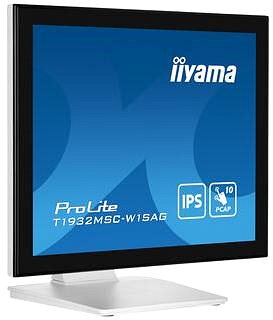
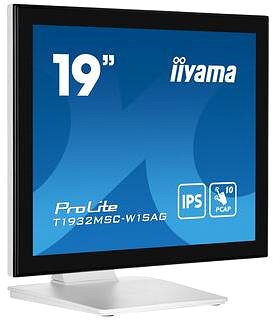
Key Features of the 19" iiyama ProLite T1932MSC-W1SAG Monitor
- Work efficiently with this 19" iiyama LCD monitor with HD (1280 × 1024) resolution
- It uses an IPS panel for colour display with a refresh rate of up to 60Hz and a response time of 14ms
- The standard 5:4 aspect ratio offers a clear image output
- The maximum brightness of 250cd/m² is optimal for working out of the sun and also for rooms that are not too brightly lit
- Flat monitor design
The iiyama monitor offers you many interesting functions and features
The 19" IPS PC monitor has a flat design, which is ideal if you plan to use multiple monitors at the same time. With the touchscreen, you can write, draw as if on paper, edit graphics directly on the display, or even model templates for 3D printing. You can tilt the monitor so that its top edge corresponds to eye level, helping to maintain correct posture, which minimises strain on the cervical spine and reduces the risk of scoliosis. The ability to tilt the monitor is especially appreciated by people who stand at their desks while working. It can be chosen as an advertising monitor for displaying appealing content in public spaces, where it will attract the attention of people nearby.
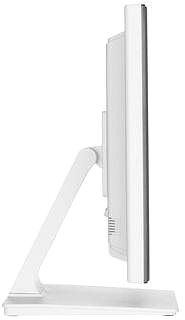
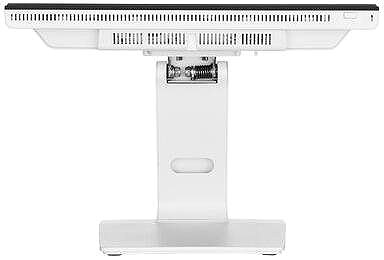
The iiyama monitor's features will pleasantly surprise you
You can connect the monitor to a computer or laptop using HDMI, DisplayPort and VGA. If your computer does not have a suitable connector, you can expand the connectivity by purchasing a compatible port replicator. You will also appreciate a port replicator when connecting two monitors. The VGA port gives you the option to connect older devices. The built-in speakers provide a convenient solution for sound and image in one device. In addition to the monitor itself, the package also includes an HDMI, DisplayPort and USB-A cable.
Choose a monitor based on its native contrast
The iiyama monitor has a native contrast ratio of 1000:1. The difference between the brightest and darkest point that a monitor can display is expressed by the native contrast ratio. If a monitor has a contrast ratio of 3000:1, it means that the brightest point (white) is 3000× brighter than the darkest point (black). Thanks to a higher native contrast, it is possible to better distinguish details in both dark and light parts of the image. A native contrast of up to 1000:1 is mainly suitable for office purposes, while you will appreciate up to 2000:1 for gaming and watching films. A value above 2000:1 is typical for monitors ideal for graphic designers and video editing.
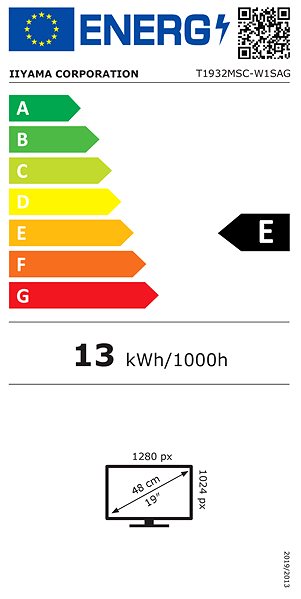
Data stated on the monitor's energy label:
- The manufacturer and model of the monitor are listed in the header
- Scale of energy classes (left), specific energy class of the product (right)
- kWh/1000h: energy consumption in kilowatt-hours per 1,000 hours of operation
- SDR kWh/1000h: energy consumption in SDR mode in kilowatt-hours per 1,000 hours of operation
- HDR kWh/1000h: energy consumption in HDR mode in kilowatt-hours per 1,000 hours of operation
- Pixels: vertical and horizontal display resolution (1280 × 1024 px)
- Units in inches and centimetres: screen screen size
__________________________________________________________________
After scanning the QR code, you will be redirected to the European EPREL database, where you will see the display type, the technology used in its production (e.g. LCD, QLED) and other monitor specifications.
screen size:
19"
Graphics Interface:
HDMI, DisplayPort and VGA
Graphics Interface Standards:
DisplayPort 1.2 and HDMI 2.0
Energy Class in SDR Mode:
E
Consumption in SDR Mode:
20 kWh/1000h
Energy Class in HDR Mode:
E
Consumption in HDR Mode:
20 kWh/1000h
Dimensions:
41.35 × 43.2 × 23.95cm (H×W×D)
Weight:
5.4kg
Specifications
Display diagonal and resolution
Construction
Panel and screen technology
Aspect Ratio
Connection
Features and functions
Dimensions and weight
Packaging
Energy specifications
Colour
| Code: | WA825d8b |
| Links: | Product Fiche Producer's Website: |