
27" Philips 272S1MH


27" Philips 272S1MH
This 27" Philips LCD monitor with standard Full HD (1920×1080) resolution is ideal for working with office software, managing emails and browsing the web. It also works brilliantly for occasional gaming, watching movies and streaming videos. Its IPS panel delivers excellent colour reproduction, keeping the picture quality sharp even when viewing from an angle. This makes it perfect for preparing documents before printing or creating presentations. The anti-reflective screen coating effectively reduces glare and improves visibility in various lighting conditions. Thanks to the standard 16:9 aspect ratio, you can easily open two document windows side-by-side to work efficiently. The maximum brightness of 250cd/m² is practical for working in environments without harsh sunlight and is equally suited to dimly lit rooms. You can also mount it on the wall using a 100×100 VESA mount, which is ideal if you have a smaller desk or use multiple monitors. This layout is especially useful for trading, monitoring CCTV systems and more.


Key features of the 27" Philips 272S1MH monitor
- Work efficiently with this 27" Philips LCD monitor featuring Full HD (1920×1080) resolution
- IPS panel delivers vivid colours with a refresh rate of up to 75Hz and a 4ms response time
- Anti-reflective screen surface reduces glare and improves readability in various lighting conditions
- Standard 16:9 aspect ratio provides a precise visual output
- Features 8-bit colour depth
- Maximum brightness of 250cd/m² is suitable for working away from direct sunlight and in dimly lit rooms
- Flat screen design
Philips monitor surprises with great features and functions
This 27" IPS PC monitor features a flat design that makes it easy to use several monitors side-by-side. It includes a filter that reduces harmful blue light emissions and Flicker-free technology to minimise screen flicker. This helps reduce eye strain and improve sleep quality. You can adjust the monitor so that the top of the screen aligns with your eye level, helping you maintain correct posture, protect your cervical spine and prevent back strain. Thanks to the pivot function, you can rotate the screen by 90°, which is highly useful for traders, programmers and data analysts working with spreadsheets. The vertical view simplifies work and reduces the need for constant scrolling.


Philips monitor boasts great connectivity and equipment
Connect the monitor to your computer or laptop using HDMI, DisplayPort, VGA and DVI. If your computer lacks the right connector, you can easily expand your options by purchasing a compatible port replicator. A port replicator is also handy for connecting two monitors. The VGA port allows you to connect older devices, while built-in speakers provide a convenient all-in-one audio and video solution. It also features a built-in webcam, which is perfect for streaming, team calls, keeping up with friends or chatting on Discord. Along with the monitor itself, the package includes VGA, HDMI, DisplayPort and USB-A cables.
Choose a monitor with the right colour depth and native contrast
Colour depth determines the variety of colours a monitor can display. For example, a 6-bit monitor can display nearly 300000 colours, whereas a 10-bit monitor can show over a billion. A higher colour depth ensures smoother gradients and a more realistic, vibrant picture. The colour depth of this monitor is 8-bit. The Philips monitor features a native contrast ratio of 1000:1. The native contrast ratio expresses the difference between the brightest and darkest points the screen can produce. If a monitor has a contrast ratio of 3000:1, it means the brightest white is 3000× brighter than the deepest black. A higher native contrast helps display finer details in both dark and light areas of the image. A native contrast of up to 1000:1 is ideal for office work, up to 2000:1 is great for gaming and watching movies, while values above 2000:1 are characteristic of monitors designed for graphic design and video editing.
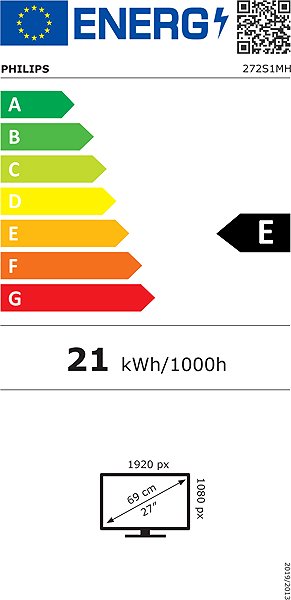
Information on the monitor energy label:
- The header displays the manufacturer and model of the monitor
- Energy efficiency scale (on the left), specific energy rating of the product (on the right)
- kWh/1000h: energy consumption in kilowatt-hours per 1000 hours of operation
- SDR kWh/1000h: energy consumption in SDR mode in kilowatt-hours per 1000 hours of operation
- Pixels: vertical and horizontal resolution of the display (1920×1080px)
- Screen screen size measured in inches and centimetres
__________________________________________________________________
Scanning the QR code redirects you to the European EPREL database, where you can view the display type, technology used in its production (e.g. LCD, QLED) and other detailed specifications of the monitor.
Screen size:
27"
Colour gamut (Adobe RGB):
81%
Colour gamut (sRGB):
102%
Video interface:
HDMI, DisplayPort, VGA and DVI
Video interface standards:
DisplayPort 1.2 and HDMI 1.4
Energy efficiency class in SDR mode:
E
Energy consumption in SDR mode:
16.23kWh/1000h
Dimensions:
53.7×61.3×20.5cm (H×W×D)
Weight:
6.22kg
Specifications
Display diagonal and resolution
Construction
Panel and screen technology
Aspect Ratio
Backlight and colour
Connection
Colour gamut
Features and functions
Colour
Dimensions and weight
Packaging
Energy specifications
| Code: | WC120a93l2 |
| Warranty: | 36 months |
| Links: | Product Fiche Producer's Website: |
| Manufacturer information |
Philips Consumer Lifestyle B.V., Tussendiepen 4 9206 AD Drachten Netherlands, www.philips.com/support Pernerova 702/39, 186 00 Prague 8, [email protected] 
|