
3Dconnexion CadMouse Pro Wireless Left
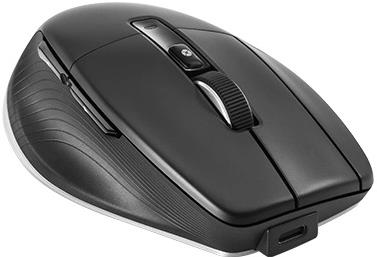


3Dconnexion CadMouse Pro Wireless Left
The CadMouse Pro Wireless Left is a full-sized, left-handed mouse designed for CAD users who prefer a left-handed mouse or need to switch from their right hand to their left to avoid Repetitive Strain Injury (RSI). The CadMouse Pro Wireless Left offers 3Dconnexion's precision technology and advanced ergonomics in a left-handed body. It is the ideal mouse for daily use by CAD professionals.

Key Features of the 3Dconnexion CadMouse Pro Wireless Left Mouse
- Optimised shape for natural wrist placement with a dedicated middle mouse button
- High-capacity rechargeable battery and high-precision optical sensor
- High-quality, long-lasting switches made from durable components and materials
- Smooth scrolling and Tick-to-Tick zooming in CAD applications
- Effortlessly zoom in and out of your geometry with a single click
- Provides quick access to your favourite application commands
- Offers convenient connectivity wherever you are, via Bluetooth® Low Energy, the Universal Receiver, or a USB-C cable
- Includes a compact, lightweight, semi-rigid travel case, created and tested in the 3Dconnexion labs
Advanced Ergonomics
The CadMouse Pro Wireless Left not only provides left-handed users with a CAD tool designed with them in mind, but it also benefits right-handed users who want to switch from their right to their left hand to avoid Repetitive Strain Injury (RSI), which so often occurs as a result of repetitive hand, finger, and wrist movements. The mouse's angled shape ensures a natural hand position and reduces the muscle and tendon pain often experienced with traditional mice. Complementing the angled shape of the mouse, the curved thumb rest provides an ergonomic place for the thumb to sit for a natural grip and easy access to its side buttons. The three main buttons of the CadMouse Pro Wireless Left have a concave design to ensure an ideal and natural fingertip position.

A Button for CAD Professionals
The middle mouse button has been designed specifically for CAD users who require a third button to access application functions. Requiring almost 60g less force than clicking a scroll wheel, the middle mouse button is ideal for CAD applications.

Maximum Durability
The average CAD specialist clicks several thousand times during a standard working day. The CadMouse Pro Wireless Left has been designed to handle over 50 million clicks on its main buttons, giving users the mechanical longevity that CAD professionals should expect from a premium CAD product. Low-friction polytetrafluoroethylene (PTFE) feet guarantee that the CadMouse Pro Wireless Left will maintain smooth, precise movements for much longer than the average mouse.


High Precision and Performance
The precision optical sensor, high adaptive response rate, and specially developed polytetrafluoroethylene (PTFE) feet give the user a feeling of complete control, as they allow the CadMouse Pro Wireless Left to precisely transmit all actions performed by the user. Fast and precise mouse operation is ensured by the lithium-polymer battery, which ensures the device will function for 2 months between charges.
Professional Scrolling and Zooming in CAD
During a demanding working day, CAD professionals need to zoom in and out of 3D environments with complete precision and efficiently scroll through long documents. Thanks to the improved 3DxWare 10 software, conveniently located QuickZoom side buttons, and the enhanced Smart Scroll Wheel 2, CAD users will be able to work with meticulous control of their drawings and 3D images and easily navigate documents. These features are tailored to their needs.


Smart Mouse Wheel 2 and QuickZoom Function
The adjustable smart scroll speed with inertia in documents and browsers is ideal for working in multi-page documents, allowing the user to find specific pages quickly and easily. The QuickZoom function is easy to use; simply press the thumb-side buttons to zoom in and out of the cursor's position in a drawing or 3D model; to fine-tune the zoom level, hold down the corresponding button.
Easy Access to Commands and Functions
Clicking the Top Button, located directly behind the Smart Scroll Wheel 2, opens an application- or environment-specific radial menu. This allows the user to access their favourite commands with a simple mouse gesture. The 3DxWare 10 software allows you to customise the radial menus for each CAD environment.

Specifications
Connection
Mouse interface
Mouse use
Compatibility
Sensor
Mouse buttons
Other mouse features
Dimensions and weight
Colour
In the package
Charging // EU Directive
| Code: | CONE040c4 |
| Warranty: | 24 months |
| Links: | Producer's Website: |