
MOZA Flight MGX1000 Instrument Panel
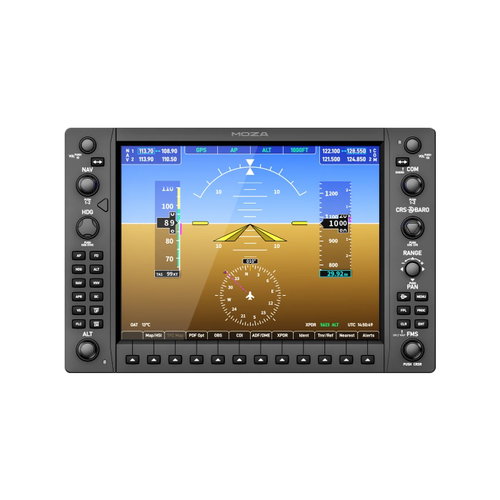
MOZA Flight MGX1000 Instrument Panel
MOZA Flight MGX1000 Instrument Panel
Professional Garmin G1000 Instrument Panel for Flight Simulators
The MOZA Flight MGX1000 Instrument Panel is an advanced instrument panel for PC flight simulators that brings your home cockpit closer to a real Garmin G1000 avionics system. The 1:1 scale panel features a 10.4" IPS display with a resolution of 1024 × 768px and up to 500 nits of brightness, matching the dimensions of the actual G1000 for a clear view of flight data. Thanks to DisplayLink technology, the MOZA Flight MGX1000 transmits the image via USB, so you don't need an HDMI cable or a separate video output from your graphics card. Rotary knobs with precisely defined steps, buttons with distinct tactile feedback, and a 7-way ALPS joystick allow you to comfortably control the map, zoom in, and select functions directly on the panel. You can fine-tune the instrument panel and customise the button mapping using the MOZA Cockpit software. Additionally, the independently adjustable display, character, and status indicator lighting can be synchronised with the simulator's telemetry. The panel is compatible with G1000-equipped aircraft in Microsoft Flight Simulator 2024 and X-Plane 12, including select third-party add-ons. Thanks to the included desktop stand, VESA 75 × 75mm support, aluminium profile mounting, and bottom mounting options, you can easily integrate the MOZA Flight MGX1000 into your desk setup or a sophisticated flight cockpit.

Key Features of the MOZA Flight MGX1000 Instrument Panel Flight Sim Controller
- The MOZA instrument panel features a 10.4" IPS display with 1024 × 768px resolution for a clear view of flight data
- The true-to-life 1:1 scale design brings the panel closer to the real Garmin G1000 avionics system
- Thanks to DisplayLink technology, the MOZA Flight MGX1000 transmits video via USB without the need for an HDMI connection
- A 7-way ALPS joystick provides intuitive control
- The MOZA Flight MGX1000 Instrument Panel can be configured as a PFD or MFD
- The MOZA Cockpit software allows the instrument panel to be synchronised with the simulator's telemetry
- The MOZA Flight MGX1000 instrument panel supports Microsoft Flight Simulator 2024 / X-Plane 12
- The MOZA Flight MGX1000 Instrument Panel provides flexible installation options
The MOZA Flight MGX1000 Delivers Controls Like the Real Garmin G1000 System
The MOZA Flight MGX1000 features a 1:1 scale control layout, allowing you to operate the panel in your flight simulation much like the real Garmin G1000 avionics system. Precisely crafted controls with distinct tactile feedback and authentic backlighting give you confidence when inputting commands and contribute to a more authentic virtual cockpit experience.

Flight Data on a Full-Size 10.4" IPS Display
Thanks to its 10.4" colour IPS display, with physical dimensions that match the real Garmin G1000 system, the MOZA Flight MGX1000 offers a more faithful representation of the instruments in your simulation cockpit. The native resolution of 1024 × 768px ensures a sharp display of flight data, while up to 500 nits of brightness and vivid colours contribute to excellent screen readability and a more realistic piloting experience.

The MOZA Flight MGX1000 Offers Video Transmission via USB
The MOZA Flight MGX1000 instrument panel uses DisplayLink technology for video transmission via USB, meaning you don't need an HDMI cable or a separate video output from your graphics card when connecting. You'll particularly appreciate DisplayLink when building an advanced simulation cockpit with multiple displays, as it simplifies their connection while also helping to reduce the load on your graphics card.

Precise Controls Ensure Confident Command of Your Avionics
For more confident control, the MOZA Flight MGX1000 is equipped with rotary knobs featuring clearly defined steps and buttons with distinct tactile feedback, providing you with a response for every input. The integrated 7-way ALPS joystick faithfully mimics the controls of the real G1000 system and allows you to intuitively zoom, pan the map, or select items directly on the panel.

Adjustable Lighting for Every Flight
The MOZA Flight MGX1000 allows for independent adjustment of the display brightness, character backlighting, and button status lighting, so you can easily adapt the panel's appearance to the lighting conditions and your simulation setup. Through its connection with the MOZA Cockpit software, the lighting can be synchronised with the simulator's telemetry, contributing to a unified and more realistic environment throughout the virtual cockpit.

Easy Setup via MOZA Cockpit
The MOZA Cockpit software allows the MOZA Flight MGX1000 to connect with the telemetry of supported flight simulators, enabling you to easily synchronise and configure the panel according to your simulation setup. Each panel can be independently set as a Primary Flight Display (PFD) or a Multi-Function Display (MFD). When using multiple units, you can create a more sophisticated instrument assembly.

A Compact Instrument Panel for Your Flight Cockpit
Thanks to its slim and lightweight design, the MOZA Flight MGX1000 maintains the necessary rigidity and a realistic panel appearance. Its low weight of 1.17kg reduces the load on mounting elements and makes it easier to integrate the panel into various simulation cockpit configurations, whether you're using it as a standalone unit or as part of a larger instrument assembly.

Flexible Mounting Options
With several mounting options, you can easily adapt the MOZA Flight MGX1000 instrument panel to your simulation setup. You can use the included desktop stand, install it on aluminium profiles, use the standard VESA 75 × 75mm mount, or the integrated mounting points on the panel's structure. This allows you to easily incorporate the instrument panel into a simple desk setup or a sophisticated flight cockpit.

The MOZA Flight MGX1000 Instrument Panel is Compatible with G1000-Equipped Aircraft
The MOZA Flight MGX1000 instrument panel is compatible with aircraft using the G1000 system in Microsoft Flight Simulator 2024 and X-Plane 12, including select third-party add-ons like the COWS Diamond DA40/DA42 or the Daher Kodiak 100 by SWS. Thanks to flexible screen mirroring and fully customisable button mapping, you can configure the panel for a wide range of aircraft equipped with G1000 avionics. Support for Microsoft Flight Simulator 2020 and X-Plane 11 will be added through future updates to the MOZA Cockpit software.
- Cessna 172 Skyhawk G1000
- Beechcraft Bonanza G36
- Diamond DA40 NG
- Diamond DA40 / DA42 (COWS)
- Cirrus SR22 (Asobo) Daher
- Cessna 400 Corvalis TT
- Diamond DA62
- Beechcraft Baron G58 Lancair
- Cessna 208B Grand Caravan
- Cessna 408 SkyCourier
- Grumman Albatross G111
- Daher Kodiak 100 (SWS)
- Pilatus PC-6
- Lancair Evolution N844X
- Van's Aircraft RV-10
- BETA Technologies Alia-250
- Cessna 172 SP
- Cirrus Vision SF50
- Cirrus SR22

Specifications
Platform
Inputs and outputs
Connections
Dimensions
Weight
Colour
| Code: | moza25047 |
| Warranty: | 24 months |
| Links: | Producer's Website: |