
Nous L5 WiFi Smart IR Remote Tuya
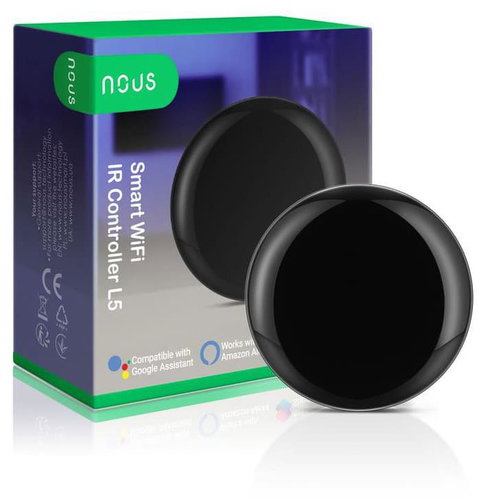


Nous L5 WiFi Smart IR Remote Tuya
The Nous L5 WiFi IR Smart Remote Controller is an elegant smart device that can turn any IR device into a smart one. Whether you want to control your TV, air conditioner, fan, or other IR device, you can do it with the Nous L5 WiFi IR remote controller. Users can create a smart app scene for common home appliances by adding a smart remote controller. Connect the device to a power source and make sure your phone is connected to a 2.4GHz WiFi band.

Key Features of the Nous L5 WiFi Smart IR Remote Controller Tuya
- Ability to create scenes and automations in the Nous Smart Home app
- Control devices via Wi-Fi (2.4GHz band)
- Supports an IR code database for quickly adding common devices
- Learning function (DIY) for manually learning IR signals from original remote controls
- Indicator LED signals operation and IR signal transmission
- Simple device adding via the mobile app
- Option to reset the device (default and compatibility mode)
- Compact and elegant design suitable for any home
- Turns classic IR devices into smart devices with remote control via a mobile phone
Compatible with the Tuya platform
Tuya Smart is a universal smart home application that brings together devices from many manufacturers into one clear ecosystem. It allows for convenient control, automation, and integration with popular voice assistants across Android and iOS platforms. It is an ideal choice for both beginners and advanced users who want to have their smart home fully under control.
Compatible with the manufacturer's app
To use the product's smart features, you need to add the device to the manufacturer's application. You can find more information about the app (name, supported OS, supported languages) and how to add the device to the app in the product manual.
How to add a device to the Nous Smart Home app
Open the "Nous Smart Home" app and click on "Add Device" or "+".
Select "Remote Controller" in the "Device List" and add the device.
Reset the network (default mode).
Press and hold the reset button for more than 5 seconds until the network indicator starts flashing.
Follow the app instructions to add the device.
Go to the "Add Device" page and click the "Confirm indicator is flashing" button.
Enter the Wi-Fi password.
Connect the device (do not unplug it during connection).
After successfully adding the device, click the "Finish" button.
Once successfully added, the device can be found in the "My Home" list.

Add a fixed remote control
Adding a fixed-class electrical remote control, such as an air conditioner remote, a TV remote, a set-top box remote control, etc., based on the existing classification, is a simple and fast method, but it is limited by the code database data.
Please note:
It cannot be guaranteed that the electrical appliance can be 100% controlled by the infrared remote control. The appliance may not support control.

Network reset (compatibility mode)
Press and hold the reset button for more than 5 seconds; the indicator light will flash blue and enter a flashing state.
Press and hold the reset button for more than 5 seconds to enter slow flashing mode, then follow the app instructions to add the device.
Go to the "Add Device" page and click the "Confirm indicator is flashing" button, then enter the Wi-Fi password.
Connect the device (do not unplug it during connection); after successful addition, click the "Finish" button.
Once successfully added, the device can be found in the "My Home" list.

DIY Function
If you cannot find a remote control to control the appliance using the two methods above, you can use the learning function (DIY) to enable the smart remote to control the appliance. When infrared light is transmitted, the indicator light flashes to signal normal operation. The infrared launch tube is in the area above the indicator light. When learning (DIY), point the device's remote control at the indicator area from 3cm away.

Safety notice:
Read the manual carefully. Use the product within the temperature and humidity limits specified in the technical data sheet. Do not install the product near heat sources such as radiators, etc. Do not allow the device to be dropped or subjected to mechanical stress. Do not use chemically active or abrasive cleaning agents to clean the product. Use a damp flannel cloth for this purpose. Do not disassemble the product yourself - diagnostics and repairs must only be carried out at a certified service centre.
Specifications
Connection
Connectivity
Use
Location
Features
Material
Usage
Dimensions and weight
Packaging
| Code: | KAMmb06 |
| Warranty: | 24 months |
| Links: | Producer's Website: |
| Manufacturer information |
L-TRADE GROUP Sp. z o.o., ul. Grzybowska 43, 00-855 Warszawa, Polska; [email protected]; https://nous.technology 
|