
This page contains frequently asked questions about KB852CM. If you are considering buying this product, you may want to read the discussion or ask more questions about KB852CM. They will be answered by our specialists.
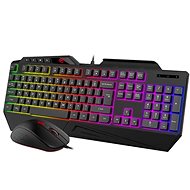
Zdravím. Jak přepmu na CZ klavesnici.Nikde žádný návod.
Alza Expert,11. 10. 2024
Pro přepnutí na českou klávesnici u produktu Set klávesnice a myši KB852CM, postupujte podle následujících kroků:
Otevřete Nastavení na vašem počítači.
Přejděte do sekce Čas a jazyk.
Vyberte Jazyk a poté klikněte na Přidat jazyk.
Vyhledejte a vyberte Čeština a nainstalujte ji.
Po instalaci se vraťte do sekce Jazyk a nastavte češtinu jako výchozí jazyk klávesnice.
Pokud máte více jazyků, můžete mezi nimi přepínat pomocí klávesové zkratky Alt + Shift nebo Windows + Mezerník.
Tento postup by měl zajistit, že vaše klávesnice bude psát v českém rozložení. Pokud máte další dotazy, neváhejte se obrátit na naši zákaznickou podporu.
Alza.cz a. s., Company identification number 27082440, use cookies and other data to ensure the proper functioning of the website and, with your consent, also, among other things, to personalize advertising and the content of our websites. By clicking on the “I understand“ button, you agree to the use of cookies and the transfer of data regarding the behavior on the website for displaying targeted advertising on social networks and advertising networks on other websites.