
Reviews Canon i-SENSYS MF664Cdw
Interested in reviews of Canon i-SENSYS MF664Cdw? It got 4.8 out of 5 stars from our customers. Find specific customer reviews of Canon i-SENSYS MF664Cdw below. We will appreciate if you also share your experiences with Canon i-SENSYS MF664Cdw after purchasing.
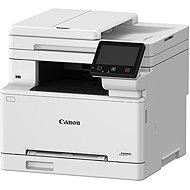
Canon i-SENSYS MF664Cdw
Currently Unavailable

Daniela, Kutná Hora
Rated 22/11/2026, variant Canon i-SENSYS MF664Cdw
Verified purchase
The Canon MF664cdw printer offers elegant and very intuitive operation, making it quick and easy to get to grips with. Although it has somewhat bulkier dimensions and a heavier weight, these parameters are fully offset by its rich feature set and reliable performance. A major benefit is, above all, the wireless network connection, which frees you from unnecessary cables and allows you to conveniently print and scan files remotely from various devices.
0 ×Report
Automatic translation

Marek, Chrášťany
Rated 21/11/2026, variant Canon i-SENSYS MF664Cdw
Verified purchase
I use the Canon i-SENSYS MF664Cdw at home for everyday printing and I am happy with it. The Wi-Fi connection works without any issues and the colours are very impressive for a laser printer. It's just a shame that the feeder doesn't support double-sided scanning. And it is a bit on the larger side, which is something to keep in mind when choosing a spot.
Wi-Fi works without any issues
Reliable for everyday home printing
It cannot do automatic double-sided scanning
Slightly larger dimensions
0 ×Report
Automatic translation
Tomáš, Veleň
Rated 19/11/2026, variant Canon i-SENSYS MF664Cdw
Verified purchase
I was looking for a replacement for my inkjet printer due to frequent issues with the ink drying out. So far, this printer makes a very good impression and seems to be a suitable choice for my occasional use.
Wi-Fi, USB, LAN
easy installation
simple operation
quiet
acts with quality
0 ×Report
Automatic translation
Pavel, Ptení
Rated 18/11/2026, variant Canon i-SENSYS MF664Cdw
Verified purchase
I bought this printer to replace an inkjet one, where the cartridges kept drying out due to irregular use.
First impressions are good, I am satisfied.
Excellent print quality for both colour and black and white.
automatic duplex printing
Wi-Fi, LAN, Apple AirPrint
Network scanning to PDF
Clear controls in Czech
Toner cartridges that do not dry out when left unused for a longer period
Larger dimensions and heavier weight
Higher prices for original toners
0 ×Report
Automatic translation

Petr, Turnov
Rated 18/11/2026, variant Canon i-SENSYS MF664Cdw
Verified purchase
Complete satisfaction
Nothing to fault
0 ×Report
Automatic translation
Karel, Sedlec-Prčice
Rated 17/11/2026, variant Canon i-SENSYS MF664Cdw
Verified purchase
I am extremely satisfied with the Canon i-SENSYS MF664Cdw printer. I particularly appreciate the high speed and top-notch print quality. The display controls are clear and intuitive, and the printer works completely reliably.
nothing
0 ×Report
Automatic translation

Luboš, Praha 4
Rated 17/11/2026, variant Canon i-SENSYS MF664Cdw
Verified purchase
very good and fast printing
Wi-Fi, USB, LAN
duplex
network scanning – to PC, to email, to USB flash drive
printing via Wi-Fi from a mobile - Android
nothing major so far
a bit chunkier
the display can only be tilted to approx. 45°
0 ×Report
Automatic translation

Martin, Kovalovice
Rated 14/11/2026, variant Canon i-SENSYS MF664Cdw
Verified purchase
fast printing
quality printing
intuitive, simple installation
connection via Wi-Fi and USB
ability to send scans directly to email
0 ×Report
Automatic translation
Eitri s.r.o., Brno 2
Rated 13/11/2026, variant Canon i-SENSYS MF664Cdw
Verified purchase
fast and high quality printing
simple initial installation
connection via WiFi/LAN
lovely design
0 ×Report
Automatic translation
Jindřich, Praha 10
Rated 13/11/2026, variant Canon i-SENSYS MF664Cdw
Verified purchase
Although we haven't had it for long, we're very satisfied so far, except for that little issue with the multi-functional drawer
fast printing
quality printing
relatively simple installation
network printing options
connection via Wi-Fi and USB
nice melody at the start of printing
When inserting paper into the multipurpose tray, you have to confirm the paper size and weight every single time. I would expect that until I change it, it would just keep printing on A4 and approx. 80g/m2.
0 ×Report
Automatic translation