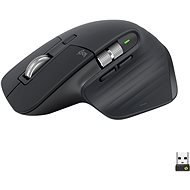
Interested in reviews of Logitech MX Master 3S Universal Graphite? It got 4.7 out of 5 stars from our customers. Find specific customer reviews of Logitech MX Master 3S Universal Graphite below. We will appreciate if you also share your experiences with Logitech MX Master 3S Universal Graphite after purchasing.
One of the best productivity mice on the market, it just fits in your hand and is great. I wouldn't buy version 4, it's overpriced and has unnecessary features. Keychron m6 sounds like an interesting cheaper alternative with 1000hz polling rate for occasional gaming
amazing mouse
expensive compared to the competition (I have not tested the competition)
Although I was looking forward to a new mouse, I am not happy with the slight change in ergonomics. On the previous mouse after 3 years the side button went away (as everyone writes), but even at that price I'm going to the MX 2S again, and I'm returning the MX 3S.... The most important thing for me is a comfortable grip, and unfortunately that didn't happen with this mouse.... I feel as if the MX 3S is leaning too much. I have a bigger hand).
silence
USB-C connector
compared to the previous generation (MX 2S), I do not like the slight change in ergonomics (after one day of use there is a severe pain in the wrist - I have to return the mouse).
the side scroll button was better positioned on the previous generation (MX 2S)
Unfortunately, I am one of the "lucky ones" who also suffered from this often-discussed defect. For a product that tries to present itself as premium, it's a very big shame for the switches to go away after such a short time. I have one Logitech mouse from 2007, which has served 15 years of daily work in the office (now only as a spare) and still works without hesitation. And at that time it cost only about 1000 CZK. And this? They cost quite a lot and to deal with such problems shortly after the warranty? A big shame and it is clear that Logitech is following the crowd of companies where quality is confused with quantity. Otherwise a great mouse with great customization options.
Ergonomic
scroll wheel and its options
setting options
within 30 months of purchase, the left KO button is already on 4 of the 5 mice we have in the family
One of my best mice, 3 in a row now. Thanks to the ergonomics, my wrist doesn't hurt anymore and the buttons are great. Especially the 3S version with silent buttons is nice.
Scrubbed on the Connect IT pad, which is slightly scuffed. I didn't have a problem with the older Logitech Marathon M705 mouse because it has a smoother "feet" surface than the MX Master 3S. I'm using it on a cotton tablecloth now and it's fine.
I had to swap the Bolt Receiver to a USB port that is physically farther away than the existing Bolt Receiver for the MX Keys S, otherwise the mouse would crash. But the fact is, this is more of a dongle problem than a mouse problem.
Alza.cz a. s., Company identification number 27082440, use cookies and other data to ensure the proper functioning of the website and, with your consent, also, among other things, to personalize advertising and the content of our websites. By clicking on the “I understand“ button, you agree to the use of cookies and the transfer of data regarding the behavior on the website for displaying targeted advertising on social networks and advertising networks on other websites.