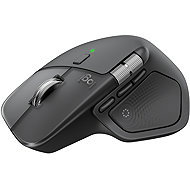
Interested in reviews of Logitech MX Master 4, Graphite? It got 4.5 out of 5 stars from our customers. Find specific customer reviews of Logitech MX Master 4, Graphite below. We will appreciate if you also share your experiences with Logitech MX Master 4, Graphite after purchasing.
If you believe it will be compatible on your device and you don't mind 125Hz so probably a good mouse if you take advantage of the features. I find it quite frustrating to use after every run.
The gesture button is great (when the app works)
Action ring is also quite useful (when the app is working)
Sidescroll for programmers is great (when the app is running and the mouse knows your set speed)
Line scroll is super nice (when the app is working, it's smooth)
Mouse speed setting in the app is great (when the app is running, otherwise you get DEFAULT)
Mouse functions work ONLY if you are running an application, which requires the devs to create a stable application that doesn't need to be hard shut down in processes every time you turn on the PC so I have to turn it back on.
125Hz - did they expect people who buy such an expensive work mouse to have 60Hz monitors?
Although I'm happy with what the mouse offers for features as I've written before, those features depend on whether their app is working right now.
The mouse apparently has no memory for settings so it is reliant on a pretty low quality app.
I'm switching from MX Master 3 and it's amazing. But it should be noted that it is not a gaming mouse for it is very heavy. But as an office mouse for programming, it's amazing.
Plastic surface
Silicone instead of rubber (the material should not deteriorate as quickly as on previous models)
Silent handles
Great to hold
For advanced features you need to install software from logitech
It has no internal memory so it must be set up separately on each device
Compared to the previous MX Master, it is harder to hold and lift, so it gives a heavier impression (although the weight difference is minimal). On the other hand, it won't look like it's been pulled out of a cow's mouth after a few months. And it seems to me that it slides harder - but maybe it's just not used yet.
I've had five older MX mice and I was looking forward to this one because my current MX Master 3 suffers from surface peeling. But I am disappointed with the purchase - my piece was defective, the front buttons did not fit at all, each clicked differently loud and deep, and overall the mouse did not give me a very good impression. And only 125 Hz polling rate, I don't get it at all. On better monitors, this leads to choppy cursor movements on the screen. In this price range, I would have imagined something different.
The material is different than the 3S, we'll see with longer use how it performs.
battery life
pleasant to use
glides beautifully on the mat
better wheel sensitivity than 3S
haptic response can be used by only a few programs provided that supporting software is installed
due to the material processing more "slippery" in the hand than the previous version. (not rubberized)
0 ×Report
Automatic translation
Try our cookies
Alza.cz a. s., Company identification number 27082440, uses cookies to ensure the functionality of the website and with your consent also to personalisage the content of our website. By clicking on the “I understand“ button, you agree to the use of cookies and the transfer of data regarding the behavior on the website for displaying targeted advertising on social networks and advertising networks on other websites.