
Reviews MSI B550 GAMING WIFI
Interested in reviews of MSI B550 GAMING WIFI? It got 4.8 out of 5 stars from our customers. Find specific customer reviews of MSI B550 GAMING WIFI below. We will appreciate if you also share your experiences with MSI B550 GAMING WIFI after purchasing.
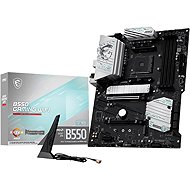
MSI B550 GAMING WIFI
In stock > 5 pcs
2,999,-
Add to Cart

Jan, Náchod 1
Rated 11/07/2026, variant MSI B550 GAMING WIFI
Verified purchase
I’m neither a hater nor a big fan of any particular brand, although Asus has long enjoyed my trust when it comes to durability. In any case, I can recommend this B550.
Mystic Light works straight away (unlike Aura Sync)
Wi-Fi shark with a magnet
the pack contains 3 wheel bolts
The USB-A 3.2 pins are neatly housed in a plastic cradle, just as shown in the pictures (unfortunately, on my second PC with an Asus B650, this was only the case in the pictures; in reality, I had to wait 14 days for a 90° adapter from eBay just so that the connector from the case would stay in place at all).
A well-organised website with drivers
I’d be interested to know how it’s possible that, even after updating to the latest BIOS (which I did as a precaution before my first attempt at installation), Windows still throws up a message about incompatible hardware and I have to go into the settings just to get the installation to start at all (I understood this last year with the Asrock motherboards with B520m for 1,500 Kč in a PC for a friend, but here it’s a mystery to me).
A snap-on metal backplate is a bit of an anachronism, but of course that’s not a problem
The MSI BIOS isn’t one of my favourites and I find it rather confusing. Why, for example, do I have Are there two ‘Settings’ options (Motherboard and Security) in the main menu, both with the same graphical style?
0 ×Report
Automatic translation

Ivan, Velká Bíteš
Rated 18/06/2026, variant MSI B550 GAMING WIFI
Verified purchase
It is essential to update the BIOS to the latest version before assembly, using a USB drive and the flash button, with the processor and memory not yet installed. There are detailed instructions on the MSI website. The BIOS update takes about 7 minutes – do not switch off the computer! The LED will go out once the process is complete; then switch off the power and fit the components.
functional
The BIOS must be flashed before assembly.
0 ×Report
Automatic translation