
Reviews QNAP TR-004
Interested in reviews of QNAP TR-004? It got 4.2 out of 5 stars from our customers. Find specific customer reviews of QNAP TR-004 below. We will appreciate if you also share your experiences with QNAP TR-004 after purchasing.
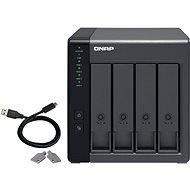
QNAP TR-004
In stock 1 pcs
6,169,-
Add to Cart

Tomáš, Brno 2
Rated 23/08/2026, variant QNAP TR-004
Verified purchase
The TR-004 is not for those expecting comfort without any Linux knowledge, especially if they want to use it as an External Storage Device for a QNAP NAS. I certainly ran into problems. First, I created the initial RAID group, 2x 1TB in RAID 1. I had to do this via the QNAP Windows software, as it can't be done through the NAS. Right away, there were a few errors saying it hadn't completed correctly, the software froze, and after killing the process and restarting it, it finally showed the RAID as correctly configured. Connecting it to the NAS, it was recognised and the RAID was formatted to EXT4. Everything seemed OK. I disconnected it from the NAS, inserted another 2 drives, connected it to my Windows PC via the software, and created a second group, 2x 4TB in RAID 1. It got stuck at 90%, then an error. The software crashed, and after killing it, the RAID was nowhere to be found. So I tried again, and this time it went through, everything looked OK. I disconnected it and plugged it into the NAS. It showed 1x RAID and 2x spare single disks. What the hell? So, I restarted the NAS, and now I could see 2x RAIDs, the second one unformatted. I formatted it and, oh dear, it was only formatted to 1TB. I looked into it and found that QTS has the RAID and partition swapped. What the hell? So I opened the console, deleted the partition and created a new 4TB one, formatted it, everything OK, but the QTS NAS still shows the partitions swapped with the individual RAID arrays. This is dangerous, because if you want to format one of the RAIDs, it sends the format command to the other one, and you lose your data. At that point, I turned to ChatGPT. I sent it what it needed, it found the problem, sent me a few commands, and fixed the mapping. Copying from PC over the network to the NAS and via USB to the TR-004
Write 130MB/s
Read 200MB/s
Disks in SW RAID (SSD and WD RED HDD)
Nice and light box.
You can't hear the fan.
USB-C
If you're using RAID, it has to be on all slots. You can't use RAID 1 and have 2 single disks, for example.
The RAID can only be configured via the Windows software. It can't be done through a NAS External Storage Device, even though you'd expect it to, especially when the whole GUI is set up for it.
The Windows software is a failure, I haven't managed to create a RAID on the first attempt even once.
For SSD drives, you must use screws to secure them. The plastic holder that replaces the screws is only for HDDs.
Bugs in QTS, which made it impossible to correctly format the partition of the second RAID group, as described above. Risk of data loss. Fix via terminal for experienced users.
Even though this is supported as external storage for a QNAP NAS, it doesn't support the RECYCLE BIN like internal drives do.
You have to insert the tray with the HDD very carefully and horizontally, otherwise it squeaks and is difficult to slide in.
Crazy loud beep when you turn it on. But it doesn't matter when it's running 24/7.

0 ×Report
Automatic translation

Jiří, Milovice nad Labem 3
Rated 20/12/2025, variant QNAP TR-004
Verified purchase - review from a price comparison website
good for data storage
complicated setup
0 ×Report
Automatic translation

Libor, Brno
Rated 07/07/2025, variant QNAP TR-004
Verified purchase
Quality workmanship
Communicates with PC
Nothing
0 ×Report
Automatic translation

Volvo Group Czech Republic, s.r.o., Čestlice
Rated 18/01/2025, variant QNAP TR-004
Verified purchase
In short, NAS by its very nature defines a site-attachable device. N=network. This is just an external drive. It has nothing to do with NAS. I bought unnecessary goods for the company.
Badly damaged goods. This is not us!
0 ×Report
Automatic translation

David, Kvasice
Rated 29/11/2024, variant QNAP TR-004
Verified purchase
Hides anywhere
Usb-c connection
It can't even play a movie in one take. It's chopping. Never again.
Speed fluctuates. It pops up and then nothing for 10 seconds, then it copies again.
Never buy again
0 ×Report
Automatic translation

Customer
Rated 10/11/2024, variant QNAP TR-004
Verified purchase - review from a price comparison website
It works exactly as described and as I expected - although the beeping when switching on is annoying, I understand, maybe it is useful for servers etc. I might recommend the manufacturer to make it configurable.
0 ×Report
Automatic translation
Miloslav, Praha
Rated 24/10/2024, variant QNAP TR-004
Verified purchase - review from a price comparison website
Good price/performance ratio
0 ×Report
Automatic translation

Kostyantyn Danylenko, Chýnov
Rated 06/07/2024, variant QNAP TR-004
Verified purchase
It' s a good product. The quality is good
I don' t have a loud sound when starting. I use it with QNAP NAS. I heard this only once when doing setup
The speed to NAS is good 150-170MB/S.
It' s a good choice for someone who wants to have stable raid storage. But with out high speed to access
The using through QTS is comfortable.It' s comfortable to use for someone without great server knowledge.
You must choose raid for yourself before start.It' s not possible to change after.
But the speed through NAS to PC is not that good 60-70MB/s.
0 ×Report
Automatic translation

Tomáš, Praha
Rated 19/01/2024, variant QNAP TR-004
Verified purchase
The NAS label may be misleading to some, but it is a DAS (an offline version of NASU) that can be used either standalone or as an extension to an existing NAS. I have tested this stuff and for people looking for higher speed in RAID5 or RAID0 you will be disappointed. Unfortunately, this drive will only run at a maximum of about the base speed of the disk. If you want higher speed, you need to use the tr002 version, where I got to 1.6 times the base disk speed. Unfortunately, then you only have to use RAID0.
nice processing
hardware raid
cheap option for people who don't need NAS
limited speed compared to tr002
beeps when switching on
0 ×Report
Automatic translation
Anonymous customer
Rated 06/01/2024, variant QNAP TR-004
Verified purchase
I use it to increase the capacity of the NAS. Configured as a NAS extension.
Quiet
Small size
Nothing yet.
0 ×Report
Automatic translation