
I-TEC Thunderbolt 2

Don't like the alternatives?
Choose from the full offer
I-TEC Thunderbolt 2

I-TEC Thunderbolt 2 Docking Station brings your workplace to a new level
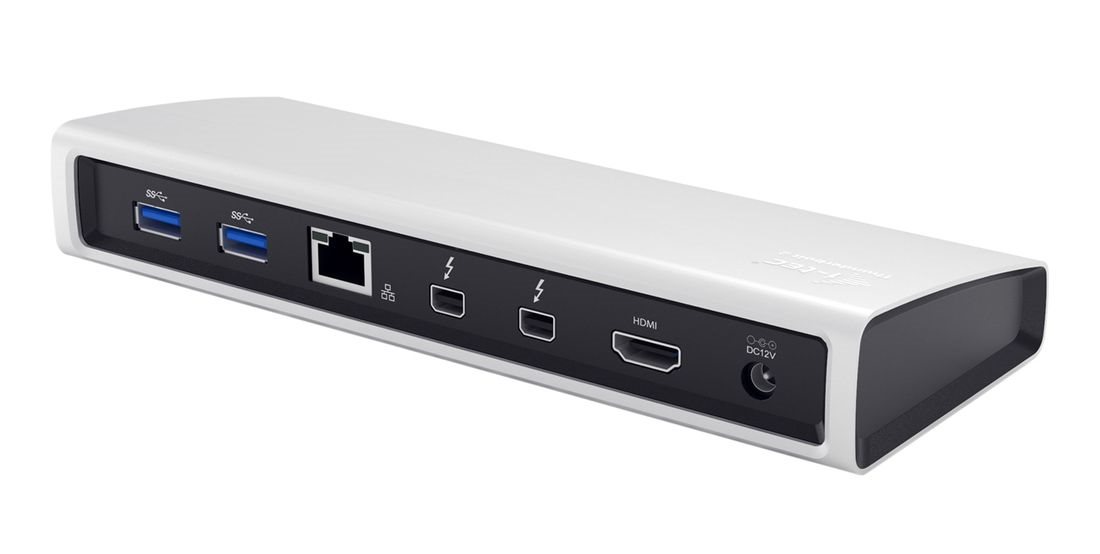
You do not need to restrict your MacBook to only the integrated ports. The I-TEC comes with a solution that will enable your device to be fully exploited. The Thunderbolt 2 docking station offers you an extremely powerful, yet easy-to-use accessory for your MacBook. It is equipped with a pair of Thunderbolt TM 20Gb/sec connectors that allow you to connect to your Mac, connect to another Thunderbolt TM device, most often an external drive or monitor (with a maximum resolution of 3840 × 2160 @ 30Hz). The docking station will excite you with its elegant metal design which has been developed in line with the ultrabook line. For comfortable conference calls and a perfect film and gaming experience, I-TEC has added a separate microphone input and a headphone output.

It will make life easier for you
With the I-TEC Thunderbolt 2, you can connect a variety of devices to your MacBook, such as a keyboard, mouse, printer, external disk, audio system, internet modem, additional monitor, and more. All of this is with the help of a single Thunderbolt TM cable (the One-Touch-System). This means that you do not have to disconnect and re-connect each time you take the Mac with you. A further nice bonus is a that all of your devices on your desk will be much more ordered and you won't have to worry about a clutter of cables.


External monitor
The 4K HDMI docking station can connect any monitor with a resolution of up to 4096 × 2160 @ 24Hz . However, if you connect the HDMI and a Thunderbolt TM monitor simultaneously, the maximum resolution is reduced to 3840 × 2160 @ 30Hz. There are also three USB 3.0 ports that are suitable not only for connecting USB devices but also for charging phones, tablets and other mobile devices. To charge Apple tablets through the USB ports of the I-TEC Thunderbolt 2 dock, a special application is available for download.
A Faster internet connection
Even if your Wi-Fi network connectivity is very good, but you want the best performance without any compromises, you should choose a wired connection using the Gigabit Ethernet port. Unfortunately, modern devices are often lacking this connector. With this docking station, Thunderbolt 2 gives you easy access to 10/100/1000Mbp/sec networks. You can rely on a high-speed internet connection without any interruptions.


Designed with an emphasis on detail
Thanks to the sculpted design, you can place the I-TEC Thunderbolt 2 dock right underneath your laptop or tablet. This saves space on your work table and, above all, ensures better air circulation. This optimises the operating temperature of your device.
Package contains
I-TEC Thunderbolt ™ 2 Docking Station
Thunderbolt ™ cable (100cm long)
AC Adapter - Input: AC 100 - 240V, 2A 50/60 Hz (130cm cable); output: DC 12V / 5A
CD with user manuals
Start guide

System Requirements
Mac OS X 10.9 Mavericks - Mac OS X 10.11 El Capitan with a Thunderbolt ™ interface, the latest firmware and software.
Windows 8.1 or later with the Thunderbolt ™ interface, the latest firmware and software.
Specifications
Dimensions and weight
| Code: | JP909 |
| Links: | Producer's Website: |