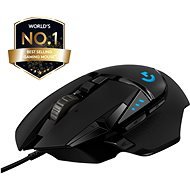
Interested in reviews of Logitech G502 Hero? It got 4.7 out of 5 stars from our customers. Find specific customer reviews of Logitech G502 Hero below. We will appreciate if you also share your experiences with Logitech G502 Hero after purchasing.
I've had long-term pain from carpal tunnel in my hands. Because of this, since 2021 I've said goodbye to my Microsoft Wheel Mouse Optical combo (another classic, though sadly not ergonomic) and the Microsoft IntelliMouse Explorer (a real monster in terms of size, but the sensor isn't anymore). I replaced them with the Logitech Ergo M575 thumb trackball. Daily use, very happy with it. Great for adventure games, but quite comically unsuitable for FPS games (TF2, Half-Life, PEAK). However, my thumb recently started to hurt from using it. So be it, I finally invested in a proper mouse (after a mishap with another mouse that was too small for me, which I successfully returned to an AlzaBox, thanks very much!). The G502 Hero has taught me that when a PC mouse isn't total rubbish (i.e., it fits your hand and you can manoeuvre it precisely even at the highest DPI without constant corrections), my carpal tunnel doesn't hurt as much. It does still hurt sometimes, but at least I can switch between my old M575 and my new G502. I use both 50/50. Who would have thought that investing pays off... Figured that out after more than five years. Oh well. :^)
A time-tested classic :)
Quality sensor
For large right-handed hands (compared to the SteelSeries Rival 3 WL Gen 2 where I was literally short by a centimetre).
Straightforward driver, option to save settings to the mouse's memory (a mouse set up this way can even be used on a retro PC with Windows 98 :P)
Lots of options with the adjustable buttons (don't like the way the DPI is set up? It can be changed however and wherever you like. Missing a feature? The macro creator will definitely sort it out, and it's unbeatable in combination with AHK.)
Wheel.
Cheaper cable
The scroll wheel and switches are a bit loud (might bother some, but not me)
The mat is a must-have!
(joke) addicted to playing with the wheel. spiiiiiiiinnnnnn
0 ×Report
Automatic translation
Petr, Brno
Rated 25/08/2026, variant Logitech G502 Hero
Verified purchase
A mouse that fits perfectly in your hand, this is my second one already
Despite the aforementioned downsides, I'll probably keep buying it because it just works for me.
The scroll wheel on the first mouse wore out.
I have a feeling there are two quality levels for this mouse. The first one I had came with a braided cable and a different wheel; now I have a standard rubber-coated cable.
I'm afraid the wheel will give out again, because it's not very sturdy.
Usually lasts 2–3 years
0 ×Report
Automatic translation
Petr, Skorošice
Rated 23/08/2026, variant Logitech G502 Hero
Verified purchase
was great for first 2 years. Now after 3 years needs replacement.
great for playing games
mouse wheel being able to rotate without stopping is great
being able to side scroll with mouse wheel is great feature
can't be diasassembled easily (the sticky glue pads are unusable after disassembly) making cleaning hard
after 2 and half a year mouse wheel press started to register sometimes. now after 3 years it almost never registers
0 ×Report
Luděk, Lysá nad Labem
Rated 18/08/2026, variant Logitech G502 Hero
Verified purchase - review from a price comparison website
Precise control
Comfortable use
Quality materials
Enough buttons
0 ×Report
Automatic translation
Patrik, Nová Ves
Rated 17/08/2026, variant Logitech G502 Hero
Verified purchase
I was happy with the mouse, it did what it was supposed to, but setting it up via the app took a while, but I managed in the end. Unfortunately, it broke after 8 months.
Nice mouse. The weights are great.
Stopped working after 8 months, now I'm dealing with a warranty claim.
0 ×Report
Automatic translation
Tomáš, Praha 5 - Stodůlky
Rated 10/08/2026, variant Logitech G502 Hero
Verified purchase - review from a price comparison website
A timeless classic. This is my third one already and I don't see myself changing any time soon.
0 ×Report
Automatic translation
Oldřich, Pozdeň
Rated 27/07/2026, variant Logitech G502 Hero
Verified purchase
As far as I’m concerned, the mouse is quite nice, apart from the weight and the rubberised material around the thumb. It might not bother some people, but it certainly bothers me.
It holds well
Lots of buttons
Quite a bit heavy
Some people might find the elastic band by the thumb a bit annoying
0 ×Report
Automatic translation
Žaneta, Poruba
Rated 18/06/2026, variant Logitech G502 Hero
Verified purchase
I wouldn’t want any other mouse. The grip is perfect, the backlighting is brilliant, and you can adjust the sensitivity directly on the mouse using the accompanying app. recommend
What an amazing mouse!
not very loud
comfortable hold
sanctification
0 ×Report
Automatic translation
Jan, Žandov
Rated 03/06/2026, variant Logitech G502 Hero
Verified purchase - review from a price comparison website
Overall luxury, I have never had a better mouse. I think it's the best-selling one.
Adjustable DPI via Win App
Adjustable weight thanks to additional weights
0 ×Report
Automatic translation
Josef, Jablonec nad Nisou
Rated 23/05/2026, variant Logitech G502 Hero
Verified purchase
TOP gaming mouse
I have to make two more lunches for my sons: -) but defacto PLUS: -)
0 ×Report
Automatic translation
Try our cookies
Alza.cz a. s., Company identification number 27082440, use cookies and other data to ensure the proper functioning of the website and, with your consent, also, among other things, to personalize advertising and the content of our websites. By clicking on the “I understand“ button, you agree to the use of cookies and the transfer of data regarding the behavior on the website for displaying targeted advertising on social networks and advertising networks on other websites.