
Xerox VersaLink C500N
Don't like the alternatives?
Choose from the full offer
Xerox VersaLink C500N
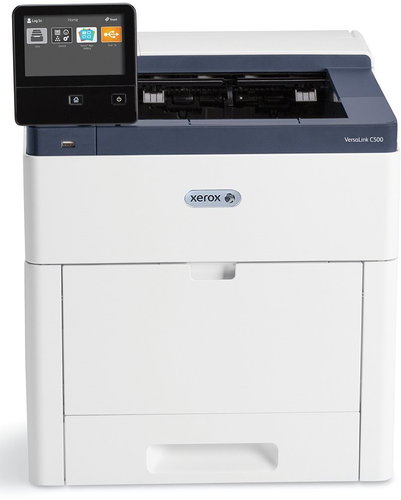
Bet on fast and seamless processing of your company tasks. The Xerox VersaLink C500N colour laser printer prints documents in 1,200 x 2,400 DPI quality. The device can print up to 43 A4 colour pages in one minute. The redesigned hardware has fewer moving parts and a more advanced, high-quality Hi-Q LED print head for long-lasting performance under heavy load.
Key Features of the Xerox VersaLink C500N (C500V_N) Laser Printer
- High-volume colour printer (up to 120,000 pages per month)
- Sharp text and graphics (1,200 x 2,400 DPI resolution)
- High print speed (43 ppm)
- Touch screen for easy configuration and intuitive controls
- Compatible with input trays, stand, WiFi module, etc.
- Ethernet, USB 3.0, NFC Tap-to-Pair
Mobile Printing Available
The Xerox VersaLink C500N colour laser printer has a built-in network interface card (LAN) and features to make printing convenient for you and all your colleagues. Everyday office work will go more efficiently than ever before as you can print instantly and without any complicated setups. That's because it offers easy printing technologies like Apple AirPrint, Google Cloud Print, or Xerox Print Service Plug for Android and Mopria. It is also compatible with Google Drive, Microsoft OneDrive and Dropbox storage options.
High-Capacity Feeders and Toners
The Xerox VersaLink C500N multifunction laser printer will also fit the bill if you don't want to constantly replenish consumables. You can purchase feeders for up to a total of 3,250 pages per input, and you can choose high-capacity toner for printing up to 9,000 pages in colour and 12,100 in black and white. Then it will churn out one printed sheet after another without any downtime for service.
User-Friendly Touchscreen Control
With the Xerox VersaLink C500N colour laser printer, you don't have to rely solely on printing from your computer or over LAN. Print your prepared documents from a storage device via the front USB port. With the 5-inch touchscreen, you can control functions with a tap and a swipe, just like on a mobile device. The intuitive interface guides you through every task from start to finish. Don't like the layout of some functions? Customise the icon layout to suit your needs, so you can complete even the most complex tasks with the fewest steps possible.
Specifications
Power outlet type
Type
Function
Connection
Supported Paper Sizes
Scanning
Printing parameters
Dimensions
Equipment
Colour
| Code: | PX623a |
| Links: | Producer's Website: |