
How to Choose a Central Hub for Your Smart Home
A smart home can significantly simplify the lives of its residents. It allows you to connect lighting, heating, security systems, cameras, blinds, as well as selected smart appliances, and then control them with ease. The heart of any smart home is the central hub, which the user connects to via a smartphone or, in some cases, a dedicated controller. With its help, the entire smart home can be kept under control. But how do you choose the right central unit, and what should you watch out for?

Before selecting a central hub for a smart home, ask yourself
- Which devices would you like to include in your smart home?
- Do you prefer control via a phone with iOS, Android, or voice control?
- Do you want to build your smart home gradually, or purchase a complete set?
Key parameters for choosing a central unit
Communication protocol
Control method
The central unit communicates with all elements of the smart home via its own communication protocol. But how do you communicate with the central unit itself? Each unit is different, but in most cases you have one of two options, often both.
Control devices
You now know how the central unit can communicate with you and your devices. Let’s take a look at what kind of devices these actually are.
The most convenient control method is most likely via a mobile phone. The good news is that this option is supported by the vast majority, if not all, central units. Control via a browser or smart TV, on the other hand, is relatively rare and usually serves only as an alternative to mobile phone control.
Expandability
One of the core principles of a smart home is the ability to connect different devices into a single functional ecosystem. When choosing a central unit, it is therefore important to consider whether you prefer an open or closed system.
Open systems allow you to connect a wide range of devices regardless of manufacturer, as long as they share a common communication protocol. In the past, it was necessary to choose between Zigbee, Z-Wave, and other technologies, but thanks to the new Matter standard, compatibility between devices from different brands has improved significantly.
Closed systems are tied to a single manufacturer and do not allow devices from other brands to be connected, even if they use the same communication protocol. A typical example of a closed ecosystem is Apple HomeKit, where only certified products can be used.
Matter – will it change the rules of the game? In the past, it was necessary to carefully choose between an open and a closed system. Thanks to Matter, however, open systems are becoming an increasingly attractive alternative, as they allow unified integration across different brands. This means that even users of closed ecosystems (Apple Home, Google Home, Amazon Alexa) can take advantage of a wider range of devices. If you are planning a smart home with the future in mind, we recommend choosing an open system with Matter support, as it ensures long-term compatibility and expandability. On the other hand, if you are looking for a simple and reliable solution, a closed system may be the better choice.
Design
Central units are available in a wide range of designs. Most commonly, they come as a separate box that can be mounted on a wall or simply placed on the floor or a table. More advanced central units may even feature their own touchscreen display for direct control, or support voice control.
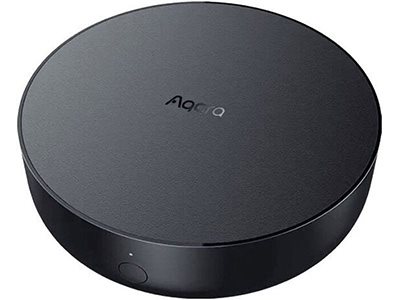
Traditional central units are designed for convenient control of either closed or open smart home systems. They can be operated using a smartphone, a dedicated remote control, or voice commands, and you can connect lighting, heating, security systems, appliances, or electrical installations to them. Their greatest advantage lies in their versatility. If all you expect is reliable smart home control, traditional central units are the perfect choice. If you are looking for something extra, consider voice assistants.
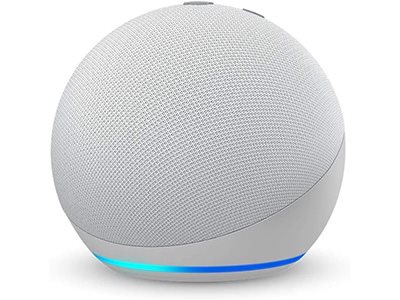
Voice assistants have been popular for several years now, so there is a good chance you already use one, either as a mobile app or as a physical device. If you already own such a device, the good news is that it can also function as a central unit for your smart home. If you currently use only the voice assistant app, you will be pleased to know that all settings (saved commands, assistant voice, voice calibration, and so on) will transfer to the new physical device. Compared to traditional central units, voice assistants also support mobile applications, but they usually cannot be connected to all smart home components.
Frequently asked questions about voice assistants
How do voice assistants differ from each other? Which devices do they support?
Voice assistants such as Amazon Alexa, Google Assistant, and Apple Siri have undergone significant development in recent years, especially in terms of compatibility and available features. Thanks to the Matter standard, which has become a common part of smart homes, connecting devices across different ecosystems is now much easier than before.
Although voice assistants can handle lighting control, monitoring data from weather stations, or managing heating, more complex scenarios and security system integrations still require a dedicated central unit. For example, if you want to secure your home with smart locks, garage doors, or complex automations, it is necessary to combine a voice assistant with more advanced systems such as Home Assistant or Homey Pro. Always check support for a specific product before purchasing, as some devices may offer only limited functionality depending on the ecosystem.
Which apps can be controlled with a voice assistant?
Today, voice assistants are not intended solely for smart home control, but increasingly serve as personal assistants connected to cloud services and applications. They enable music streaming, with the most popular services including Spotify, Apple Music, YouTube Music, and Amazon Music. Thanks to integration with multimedia devices, you can control TVs and smart speakers by voice, such as Chromecast, Fire TV, or Apple TV.
In addition to multimedia features, voice assistants also offer voice calls and messaging. They support communication via WhatsApp, Skype, or SMS, and some models even allow voice dictation of notes. Another important feature is integration with calendars and e-mail services. Users can manage meetings and reminders through Google Calendar, Apple Calendar, or Outlook, making voice assistants a useful tool for organising everyday tasks.
Thanks to advanced artificial intelligence, Google Assistant and Amazon Alexa have learned to better recognise conversational context. This means they can handle more complex commands, such as situational reminders: “Remind me to check the mail when I get home.” In recent years, voice assistants have also increasingly integrated with generative AI models such as ChatGPT or Bard, expanding their capabilities and enabling more natural interaction with users.
Which languages do voice assistants support?
The good news is that nowadays, both Google Assistant and Amazon Alexa support a variety of different languages. This means you can control your smart devices in your native language and also receive responses in the same language. Apple Siri users may still need to issue commands in a foreign language, but thanks to Matter, they can use the Apple Home ecosystem in combination with assistants that do support less common languages. Thanks to advanced AI language models, assistants are now better at recognising accents and natural speech, which has significantly improved their usability even in foreign languages.
Smart home
How to build a smart home
Smartphones were only the beginning. Today, you can make your entire home smart. The Smart Home concept has long since moved out of the realm of science fiction. A smart home represents an accessible solution for everyone. You gain a helper that simplifies everyday tasks, increases home security, and reduces energy costs.
Smart detectors and sensors
Home security should never be underestimated. The feeling of safety is unfortunately often only an illusion, which is why it is always better to prevent potential risks in advance. What options do modern security systems offer? In our guide, you will find a comprehensive overview.
Smart thermostats and thermostatic heads
Start managing your heating efficiently and easily with smart thermostats and thermostatic radiator valves. In addition to helping you save money, they provide a clear overview of current energy consumption data and ensure greater thermal comfort in your home.
Artificial intelligence
Since time immemorial, humans have sought ways to make work easier. From mechanical machines, development has moved into areas that would have been hard to believe—let alone understand—just a hundred years ago. Lately, it seems that everything around us will be SMART. Smart phones, refrigerators, cameras, homes, cars, benches, and entire cities. However, this is not artificial intelligence in the true sense of the word. Still, it is a term we hear quite often. What are the definition, applications, and future of artificial intelligence? And will innovations from giants like Google or Apple lead us into an era of benevolent robots—or Skynet?
WiFi signal boosting
Never before has WiFi speed been so important. Try counting how many wireless devices you have connected at home. You certainly won’t come up with a small number. And when you add the need for smooth video streaming, online learning, or working from home, most routers quickly run out of steam. That is why it is necessary not only to speed up your WiFi network, but also to extend its range. You can learn about the available options for improving WiFi signal strength and stability in our article.
Network security
The nature of attacks on computer networks is constantly evolving, and insufficient caution can cost you a significant amount of money. All devices on all networks should be protected. While a virus-infected home computer with vacation photos can be mourned and reinstalled, company computers containing valuable data can become dangerous weapons in the hands of cybercriminals. Attackers may sell this data or encrypt it and then blackmail you.
Central hubs for smart homes