
Microsoft 365 for families for 12 months (with automatic renewal)

Microsoft 365 for families for 12 months (with automatic renewal)

Microsoft 365 for Families (e-license with automatic renewal)
Microsoft 365 for Family offers subscriptions for one to six people, including up to 6TB of cloud storage (1TB per person), cutting-edge AI-powered productivity and creativity apps, advanced data and device security, and 24/7 customer support.
- For 1 to 6 persons
- Automatic renewal of annual subscription
- Each user can use up to 5 devices simultaneously
- Compatible with phones and computers, including Mac, iPhone, iPod and Android devices
- Up to 6 TB of cloud storage (1 TB per person)
- Word, Excel, PowerPoint, Outlook and OneNote with Microsoft Copilot for desktop
- AI-enabled image creation and editing tools
- Clipchamp video editor with premium filters and effects
- Microsoft Defender provides advanced security for your personal data and devices
- Ransomware-protected OneDrive for your photos and files
- Round-the-clock support whenever you need it
How do I activate and renew my license?
Purchasing this product will give you a subscription that automatically renews every year. Subscriptions are renewed without any further action on your part - they simply renew automatically. Once purchased, you will receive an electronic license which you can redeem as follows:
1. Log in to your Alza.cz account.
2. Visit the sectionMy library- Software and licenses (subscription) .In this section you will find all your active licenses - including options for renewing and managing them. If necessary, you can change or cancel the automatic renewal at any time.
3. Product installation procedure: visit the websitehttps://setup.office.com/ and follow the instructions.
Assign a license to another Microsoft 365 Family subscription user:
1. Proceed toof your account(the account where the license is assigned) - find the Share button and send an email invitation to the next user.
2. The new user opens the email invitation, clicks on the link, downloads and installs the Microsoft 365 package.


Excellent applications for increasing productivity and creativity
Microsoft 365 gets better every year. Get access to new features, develop your skills and explore a world of new possibilities using AI - all in one subscription.
Make your daily tasks easier
Elevate your projects and discover the possibilities of AI-powered features within Microsoft 365 that will make your daily tasks much easier.


Strengthen your security
Microsoft 365 uses modern digital protection to protect everything that's important to you.
Unleash your creativity
Let your creativity shine through with AI-enabled features in Microsoft 365. Discover hidden skills and surprise yourself with results that will push you further.


Simplify your life
Get additional cloud storage, advanced security and Al-enabled features all on one plan with Microsoft 365.
Designed with your safety in mind
OneDrive offers up to 6TB of encrypted cloud storage, with 1TB available to each user.


Create compelling content
Share your ideas, develop your skills and show your unique style.
Streamline your day
Create and share schedules, calendars and tasks right in Outlook.

Always keep track
Easily track budgets and lists in Excel.
Access on all your devices
Seamless use on phone, laptop and tablet.

Enjoy the benefits of Al with Microsoft 365

Simplify online security for you and your family


Protecting your digital world
Secure your photos, documents, emails and personal data in Outlook.
Enjoy your email without the hassle
Security and easy management features keep your emails, calendars and contacts safe and well organised.
Saving with confidence
Securely store photos, videos and documents on OneDrive, which includes built-in ransomware detection.
Protection for up to 5 devices
Continuous scanning for viruses, malicious applications and ransomware.Microsoft 365 will support you whatever our plans
AI-enabled applications are based on principles of fairness, reliability, Security, privacy, inclusivity, transparency and accountability.

Productivity apps with built-in features that offer recommendations to bring your ideas to life
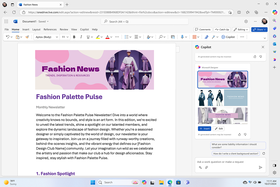
Elevate your content with Microsoft 365
Choose from a variety of themes, templates or layouts and use the integrated tools to quickly complete your projects.
Beyond the everyday world
Smart formatting, font and style suggestions in Word, Excel and PowerPoint help you create a document that's almost as unique as you are.
Clear and confident thoughts
Integrated tools in Word, PowerPoint and Clipchamp make it easy to create, edit and share your ideas through text, presentations and videos.A Microsoft 365 for Families subscription opens the way to premium features in these apps and services:


- App availability may vary by device/language. Different platforms offer different features.
- Limits on the use of AI apply. Further information: https://support.microsoft.com/cs-cz/office/understanding-ai-credits-68530f1a-4459-4d02-9818-8233c1f673b8
- Copilot in Excel requires automatic saving to be enabled. This means that the file must be stored on OneDrive. In the case of unsaved files, the function does not work.
- Copilot features in Outlook apply to email accounts ending in @outlook.com, @hotmail.com, @live.com or @msn.com and are available in Outlook.com, Outlook integrated into Windows, Outlook for Mac and iOS, and Android apps.
- Requires a Microsoft 365 subscription for an individual or family; AI features are only available to the subscription holder and cannot be shared; limits on use apply.
You need to own or create a Microsoft account to apply for a license, more informationHERE.
Frequently asked questions and answers:
- What is an auto-renewal product?
An auto-renewal product within Microsoft 365 means that your subscription will expire after a given period (e.g. 12 months) will automatically extend for another year without you having to manually renew or re-enter your payment details. - Where can I manage my membership (where can I find the license)?
You manage your subscription in your Alza account - My Library - Software and Licenses (subscriptions) - What happens if I stop automatic recovery?
Subscriptions can be terminated at any time in your Alza account. When your subscription ends, your license will be active (you will not lose the remaining days of your subscription), the next automatic renewal will not take place. You can also renew your subscription again. - They can buy several years in advance (e.g. 2 years)
No, unfortunately this is not possible. Renewal is automatic after one year. It is therefore not possible to buy multiple subscriptions. We do not recommend buying more than 1 piece. - I have an active Microsoft 365 subscription, I purchase Microsoft 365 with auto-renew early, what happens to my subscription?
- If you have an active Microsoft 365 subscription, where you have e.g. 50 days subscription and activate Microsoft 365 with automatic renewal. This way, your Microsoft account will show your Alza subscription.
- The remaining days of your subscription (e.g. 50 days) do not arrive, these unused days will automatically remain in your Microsoft account. Should you ever terminate Microsoft 365 with auto-renewal in the future, you will then see these unused days (50 days).
- You can activate Microsoft 365 with auto-renewal right away and you won't lose your original subscription. - How do I invite other members to join my family (Microsoft 365 for families)?
Adding another user to the family is via an email invitation from your main Microsoft account: https://account.microsoft.com/services/microsoft365/sharing? fref=value-banner-sharing(share button). For a new user, it follows the instructions of the invitation that the next user receives in an email. - I placed an order on Alza where I have a different email than the subscription, is this a problem?
There is no need to have the same email on your Alza and Microsoft account. You will receive a license key from us that you can add under any Microsoft account, it's up to you which Microsoft account you use it under.
Specifications
Basic parameters
License type
Software type
Included applications
License
Compatibility
Language version
| Code: | SWOFFAe_EUep |
| Links: | Producer's Website: |
| Manufacturer information |
Microsoft is a multinational corporation based in the United States. Microsoft products have had an indelible influence on our perception of virtual worlds since 1975, when Bill Gates and Paul Allen founded the company. The company is best known for its peerless software, including Windows OS and the universally used Microsoft Office suite. The company is gradually becoming more active in hardware as well - for example, with Xbox gaming consoles and Lumia mobile phones. 
|